Why has Planability introduced a validation of bank details via CoP
Planability has introduced Confirmation of Payee (CoP) validation to help reduce the risk of fraud, particularly phishing and invoice scams. CoP checks verify whether the bank account details entered for providers and participants align with the records held by the bank.
This helps protect agencies from common fraud scenarios where bank details are changed maliciously after a phishing attack or email compromise, which can result in payments being redirected to unauthorised accounts.
When will bank details be checked?
Bank details are validated when:
- a new Provider Profile is created and bank details are entered
- bank details in a Provider Profile are edited
- bank details are added to a Participant Profile
- bank details in a Participant Profile are edited
Bank account checks per Provider or Participant are limited to 3 times in total per day.
Important: As Planability cannot provide the account name associated with a bank account, and only a limited number of Confirmation of Payee checks are available per account per day, we recommend verifying the account details before adding them to a provider profile. This can be done by confirming the details directly with the provider or, where available, using your own online banking service to validate the account name.
Note: Online banking verification features, availability, and usage limits vary between financial institutions. Please check with your financial institution for information about the facilities and limits available on your account.
What will be displayed in Planability after bank account details have been checked?
If the check is successful, Planability will return one of the following results:
• Match
• Close Match
• No Match
• Account Closed
• No Account Found
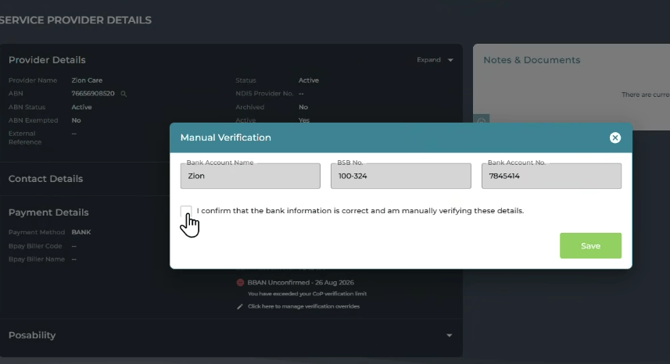
Manual Verification
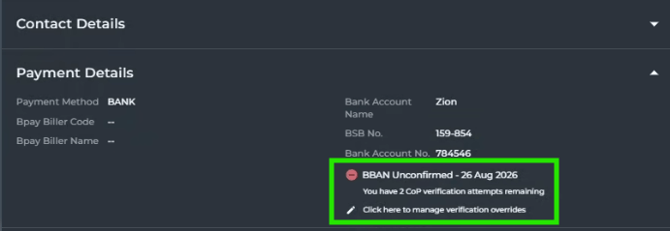
In instances where the results show 'Unconfirmed Account' or 'BBAN Unconfirmed' the Confirmation of Payee check cannot confirm this account. You may then manually verify the bank account details and name.
Will Planability block payments to accounts?
Payments will be blocked if the result is:
• Account Closed
• No Account Found
Payments will not be blocked if the result is:
• Match
• Close Match
• No Match
What does Not Checked mean?
Any Service Provider or Participant record with saved bank details that has not yet gone through the validation process will display Not Checked in the CoP field.
How will payments be handled?
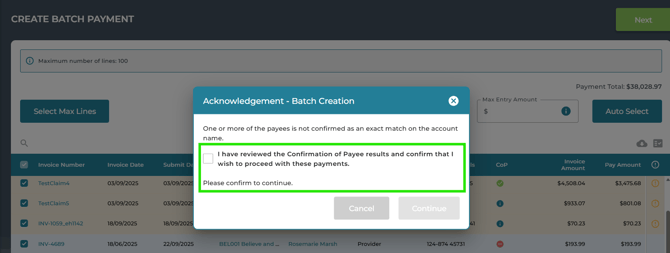
Risk Acknowledgement checkbox
If one or more payments are linked to providers or participants with a CoP result of one of the following:
• Not Checked
• Close Match
• No Match
The user must confirm they have reviewed the results and wish to proceed to payment.