
Content:
NDIS Plan - Budget Page
View Funding Period Schedule
View Funding Period Spend
Claims will be blocked from exhausted funding periods
How will scanning handle funding period spend?
Creating and Reviewing Claim Lines
Service Agreements
NDIS Plan - Budget page
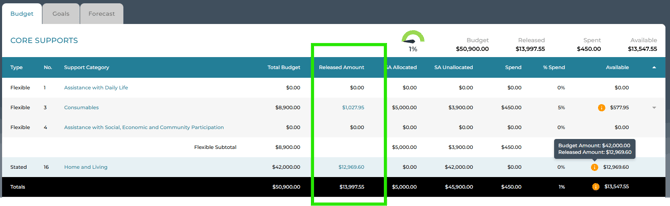
The Budget page for all PACE plans has a column for Released Amount.
The column labelled Available displays the balance of the released amount after spend has been deducted. When a new funding period begins, the Released Amount and all available budget calculations will be updated.
View Funding Period Schedule
Click on the released amount in a category to view the Funding Period Schedule for that category.
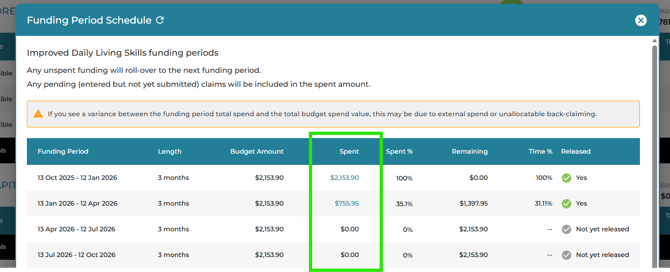
External spend is allocated to the Funding Period that is current when the spend is identified. If the budget for that funding period is exhausted, the spend will be allocated to the preceding funding period, and so on, until all spend has been fully allocated.

View Funding Period Spend
Drill deeper to view the claim lines and their value, that have been claimed from the funding period. Click on the value in the Spent column to view detail:
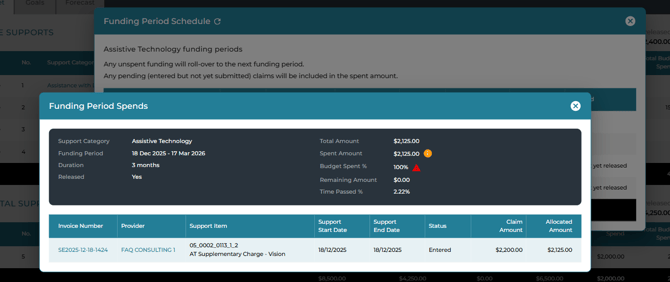
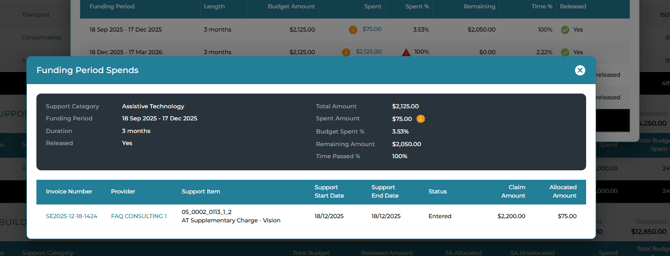
If the funding in the period of the claim is insufficient or exhausted, and there is available budget from an earlier period, the balance of the claim line will draw from that period, and it will be reflected in the Funding Period spend view:
Recent (September 2026) NDIA guidance acknowledges that support needs do not always align with funding periods and outlines circumstances where claims may be drawn from a subsequent funding period. Many Plan Managers still prefer to be alerted when a claim exceeds a funding period so it can be reviewed before proceeding. For more information, please refer to the latest NDIA guidance.
Planability's Backclaiming Guardrail helps identify these situations. With the new Skip Budget Constraint enhancement, Plan Managers with elevated permissions can now review and override the guardrail on individual claim lines.
See: Back Claiming Blocked from exhausted budget.
How will scanning handle funding period spend?
Claim lines will not be aggregated if their support dates span two or more funding periods. For example, if three claim lines relate to supports delivered in funding period 1 and one claim line relates to supports delivered in funding period 2, Planability will create two separate claim lines—one aggregated line for all period 1 supports and a second line for the period 2 support.
Creating and Reviewing Claim lines
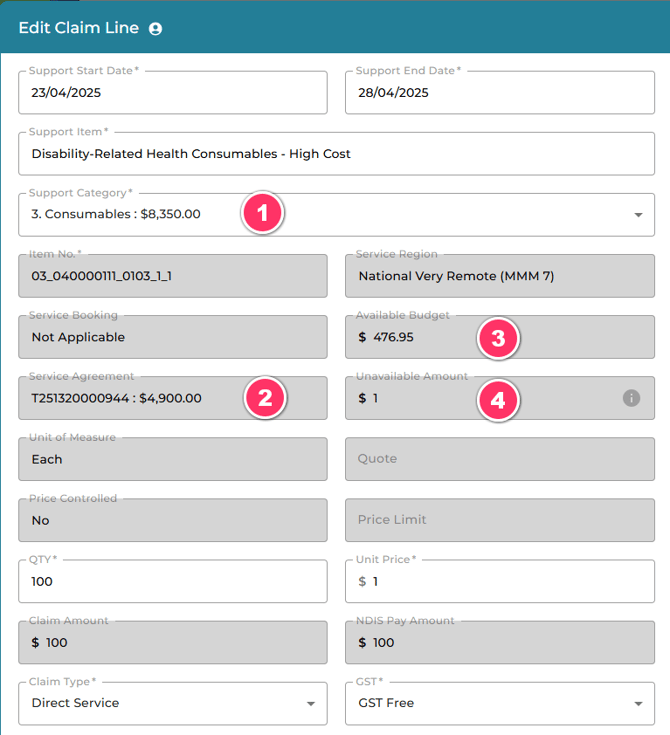
All the usual guardrails will still be applied to any claim line entered into Planability, but you will need to be aware of how the available budget for the claim line is calculated and displayed.
In-line editing:
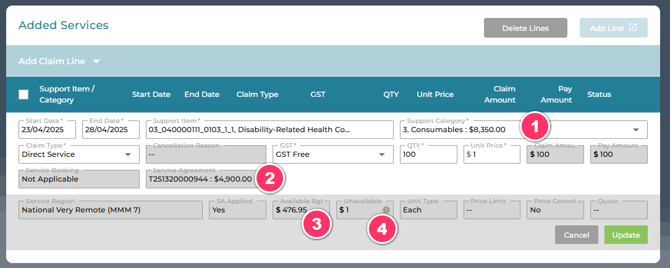
- Support Category: The total approved budget for the category for the duration of the Plan less any spend.
- Service Agreement: The remaining balance of the Service Agreement allocation for the Provider (if applicable).
- Available Budget: The remaining released amount less any Unavailable Budget (4).
- Unavailable: The amount that is not available due to pending claims or Service Agreement reserved amounts.
Pop-up editing:
PACE Plans created prior to 19th May
For PACE Plans with a start date prior to 19th May, the full approved funding for a category is available for the duration of the Plan. This figure will show in the Released amount column and will not have a hyperlink to view the Funding Period Schedule.
Non PACE Plans
There is no change to the information displayed on the Budget page for non-PACE plans.