What has changed for SIL Providers
-
For supports delivered before 1 July 2026, all providers must keep using the current code: 0115 – Assistance with daily life tasks in a group or shared living arrangement.
- For supports delivered from 1 July 2026, all providers (registered, newly registered, and those applying to register) must use the new code:
0138 – Assistance with Supported Independent Living.
What has changed for Plan Managers
-
From 1 July 2026, invoices from SIL providers will include new support items under code 0138.
-
Plan managers may only pay invoices for services delivered after 1 July 2026 if the provider is:
-
Registered under 0138, or
-
An unregistered provider that delivered SIL supports prior to 1 July 2026 and has lodged an application under registration group 0138
-
An existing unregistered provider who was delivering SIL before 1 July 2026.
-
- Plan managers should check the NDIS Commission website to confirm a provider’s registration or intent to register.
What has changed in Planability
Claim Guardrail
Any claim lines entered using the new support items under code 0138 will require an entry in the Provider NDIS Provider no. field. This field is displayed in the Claim Details and can be updated from the Provider Profile
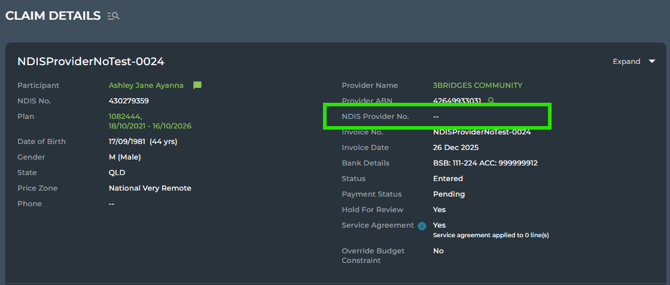
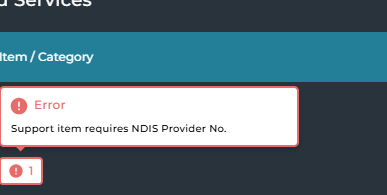
If the field is blank (--) the claim line will display a blocking error message until the provider profile has been updated with a Provider No.
Provider Profile
The Provider Number can be up to 20 alphanumeric characters and hyphens (-).
Exceptions
If the Plan Manager can confirm via the NDIS Commission website that an unregistered provider has applied to register, or was providing SIL before 1 July, they may override the guardrail by entering a temporary entry such as 'PENDING' to work with your checks.
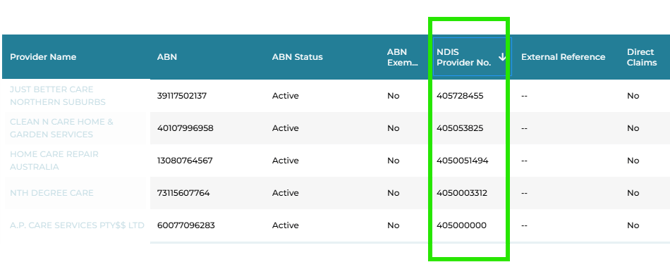
The Active Provider Listing displays a column for NDIS Provider No.