
Warning Participants - Plan and PACE Funding Period usage alerts
We’ve updated how Over Budget warnings are triggered and introduced a new alert type for PACE Funding Periods.
A Plan or Funding Period will now trigger an Over Budget alert when:- the percentage of funds spent is greater than the percentage of time elapsed in the Plan or Funding Period; AND
- the percentage of funds spent exceeds the agency threshold
The default agency threshold is 75%, and this can be adjusted on request.
These changes refine the Warning Participants listing so that budget and funding period alerts are only generated where funds are being over‑utilised relative to the time passed.
View Warning Participants listing
- the percentage of funds spent is greater than the percentage of time elapsed in the Plan or Funding Period; AND the percentage of funds spent exceeds the agency threshold
- the plan is within 50 days of expiry (shown with the number of days to expiry)
- there are no Plan Managed Service Bookings created (shown as SB Alert).
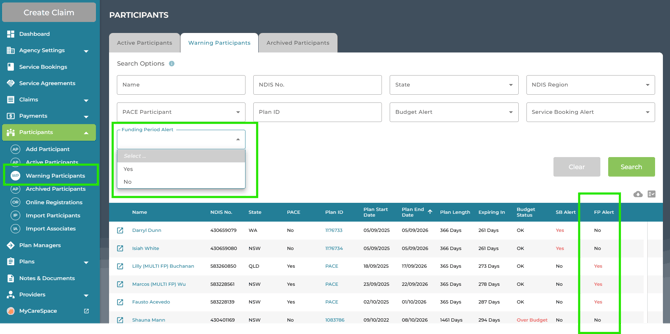
Plan Managers will be able to view only those Participants that have been associated with their user profile, unless they have elevated Participants permissions enabled on their account.
As with all listings in Planability you can edit your column view, use the search options and sort by column header.
Warning Participants Reports - Daily and Weekly emails
Daily and weekly emails are generated and sent to Directors and Plan Managers (with participant association).
The daily email highlights any participants who have just been added to the list of Warning Participants. The Weekly email, delivered on Monday morning lists all those in the Warning Participant list.
Note: If you are not receiving Warning Participant emails, check your profile settings and enable Email Notifications. If you would prefer not to receive the email notifications, we recommend you monitor the listing in Planability on a regular basis.
See: Low Budget Warnings